Paperless Life: Digitizing Documents and Receipts
How to conquer the silent anxiety of physical paper piles, legally distinguish what must stay analog from what can be shredded, and build a frictionless, encrypted digital archive.
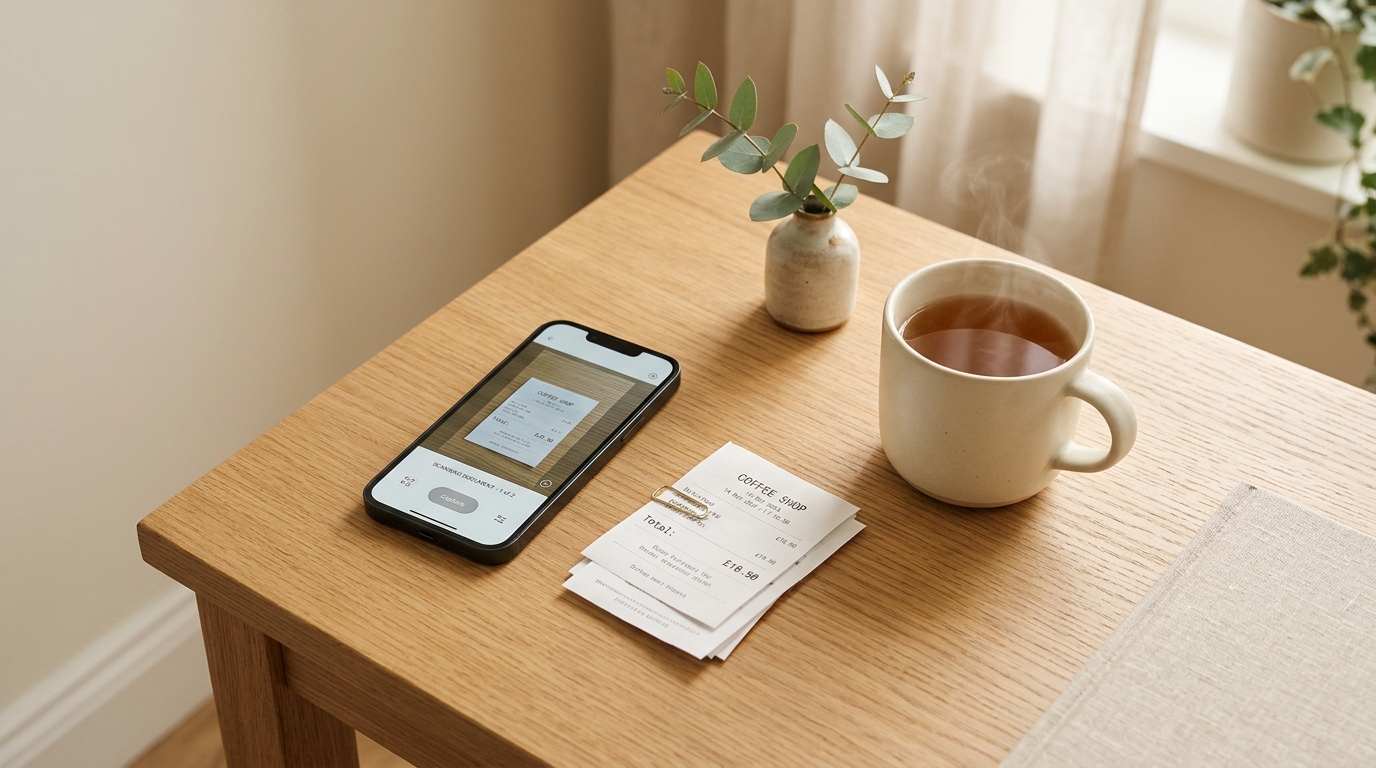
The Silent Tyranny of the Paper Pile
In almost every household, there is a corner that quietly radiates ambient dread.
It might be a designated “junk drawer,” an overflowing wicker basket on a hallway console, or a precarious stack of letters and invoices perched on the edge of your desk. Every time you walk past it, a subtle spike of tension registers in your nervous system.
Paper possesses a unique psychological weight. Unlike digital notifications that can be swiped away into an archive, physical paper occupies three-dimensional space in your sanctuary. It collects dust. It physically yellows. And worst of all, it hides behind the shield of plausible importance:
- What if this 2021 microwave warranty receipt is requested during a dispute?
- What if the tax authorities demand a printed copy of that four-year-old electricity statement?
- What if there is a critical clause printed in micro-font on page 42 of this vacuum cleaner manual?
Paralyzed by the dread of discarding something irreplaceable, we defer the decision. The pile grows thicker month by month, turning our living spaces into disorganized physical filing cabinets.
Yet here is the liberating reality: more than 90% of the paper clutter in your home has zero legal, financial, or practical reason to exist in physical form.
Transitioning to a paperless life is not about buying expensive high-speed desktop scanners or obsessing over complex folder hierarchies. It is about establishing a clear, painless triage system that separates what truly matters from what should immediately return to dust.
The Paper Triage: The Three-Category Rule
Before you scan a single document or buy a paper shredder, you must overcome the instinct to digitize everything indiscriminately. Scanning junk simply converts physical clutter into digital clutter.
Every single piece of paper that enters your life belongs to one of three categories:
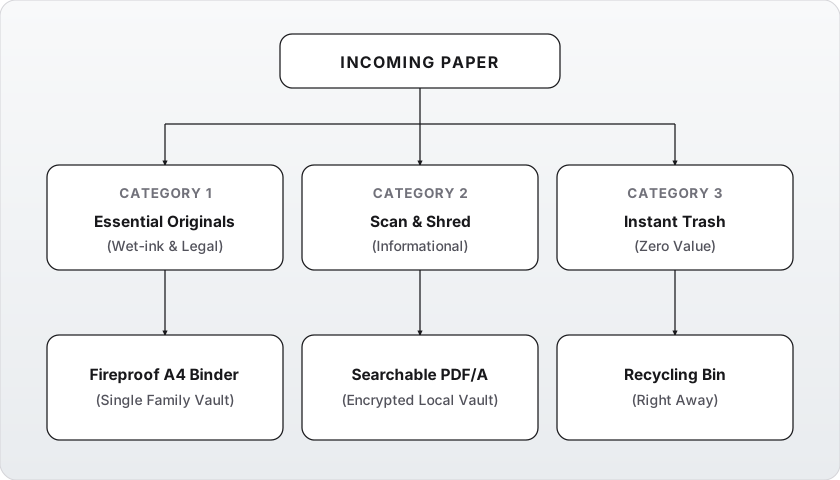
1. Essential Physical Originals (The “Wet-Ink” Tier)
These are documents where the law, institutions, or embassies strictly require the original physical paper with raised seals, watermarks, or wet-ink signatures.
In a modern European jurisdiction, this category is surprisingly tiny:
- Passports, national ID cards, and official birth/marriage/death certificates.
- Notarized real estate deeds and title registrations.
- Original court judgments, wet-ink wills, and formal custody agreements.
- Physical vehicle logbooks (if legally mandated in your country).
- Rare paper academic diplomas or certificates with embossed security seals.
For an average adult, this entire lifetime collection easily fits into a single slim A4 fireproof folder or accordion binder. If it does not require an original physical stamp or signature to hold legal validity in a court of law, it does not belong here.
2. The Digitize & Shred Tier (Searchable Digital Records)
These are documents you may need for reference, accounting, or consumer disputes, but where a digital PDF holds identical functional and legal validity:
- Annual income tax declarations and supporting tax receipts.
- Medical lab results, prescription histories, and specialist summaries.
- Major purchase receipts and active equipment warranties.
- Insurance policies, lease agreements, and employment contracts (unless original wet-ink signatures are required).
- Vehicle service records and repair invoices.
These items should be scanned into high-contrast, searchable PDF files, verified once, and then safely shredded or recycled.
3. The Instant Trash Tier (Zero-Retention Zone)
The vast majority of household paper belongs straight in the paper recycling bin:
- Appliance instruction manuals: Every manufacturer hosts searchable, up-to-date PDF manuals online. Storing a 200-page multilingual booklet for a toaster is an absurd waste of space.
- Utility bills: Water, heating, and broadband invoices are permanently stored in your online self-service provider portals.
- Expired receipts: Faded thermal receipts from purchases that have passed their return window or warranty expiration (thermal paper degrades into blank illegibility within 12–18 months anyway).
- Direct mail, envelopes, flyers, and bank marketing brochures: Open, note any urgent deadline, and recycle immediately.
Building a Frictionless Scanning Routine
A paperless system only succeeds if scanning a document takes less effort than tossing it onto a pile. If your workflow requires plugging in cables, booting up specialized flatbed scanners, and navigating clunky vendor software, you will abandon the habit within three weeks.
The ideal minimalist scanning workflow relies on the device already in your pocket.
Step 1: Use What You Already Own
Modern smartphone cameras combined with native document scanners produce scans that rival commercial flatbed hardware:
- iOS: The built-in scanner in the native Files or Notes app automatically detects document edges, corrects perspective distortion, removes shadows, and enhances text contrast.
- Android: The native Google Drive or Files document scanner provides one-tap edge detection, multi-page compilation, and instant OCR.
- Open-Source alternatives: Dedicated FOSS tools like Document Scanner (Android / F-Droid) provide clean, local-only document digitization without telemetry.
Step 2: Establish the Golden Naming Convention
A document that cannot be found when needed is functionally non-existent. Rather than creating deeply nested labyrinthine folders (Documents/Home/Appliances/Washing-Machine/Warranty/2026), rely on a standardized, chronological file naming convention:
YYYY-MM-DD_Category_Issuer_Description.pdfExamples:
2026-03-15_Medical_Stradiņa-Hospital_Blood-Work.pdf2026-07-22_Tax_VID_Income-Declaration-2025.pdf2026-09-10_Home_Warranty_Bosch-Washing-Machine.pdf2026-10-04_Auto_CSDD_Technical-Inspection.pdf
Why this works:
- Universal chronological sorting: Files automatically organize themselves in exact chronological order across any operating system or file manager.
- Instant searchability: Even without full-text OCR, a quick query for
MedicalorBoschin your file browser surfaces the exact document within three keystrokes. - Flat directory structure: You can store all reference documents in just three or four top-level folders (
Personal,Financial,Medical,Archive).
Privacy and Storage: Where Do Digital Documents Live?
When digitizing personal documents—tax filings, national IDs, medical records—blindly dumping unencrypted files into free commercial cloud services is a severe privacy gamble.
A minimalist approach balances effortless access with sovereign data privacy:
| Tier | Storage Location | Recommended Approach |
|---|---|---|
| Primary Working Copy | Local SSD on your primary computer | Store inside a clean, dedicated folder structure with regular local backups. |
| Encryption Layer | Local Vault | Use transparent client-side encryption tools like Cryptomator or VeraCrypt for sensitive records. |
| Sync & Redundancy | Private peer-to-peer or private cloud | Sync securely across your devices using Syncthing (no third-party cloud servers) or an end-to-end encrypted storage provider. |
| Cold Disaster Backup | External encrypted drive | A small, durable external SSD stored in a separate physical location or safe, updated twice a year. |
By keeping master copies in your own custody and encrypting sensitive files before synchronization, you ensure that a lost password or service terms change can never lock you out of your critical records.
The “One-Binder” Reality
Imagine a sudden emergency—a fire alarm, a burst pipe, or a sudden evacuation notice requiring you to leave your home in two minutes.
In a conventional household, panic ensues: Where are the passports? Which drawer holds the apartment deed? Where did we put the insurance contract?
In a minimalist home, the entire answer lives in a single, discrete, grab-and-go binder:
- A slim, durable waterproof/fireproof A4 pouch or zip binder.
- Labeled plastic sleeves containing the few non-negotiable physical originals: passports, birth certificates, notary deeds, vehicle registrations.
- A high-density encrypted USB drive containing your complete digital archive, kept in an inside pocket of the binder.
Everything else has been either shredded or eliminated. You can pick up your entire legal identity and life records with one hand in five seconds flat.
Deepen Your Understanding
To explore how file systems, physical spaces, and intentional routines reinforce your peace of mind:
- Guide #11: Organizing Files and Cloud Storage — Structuring folders, naming conventions, and private cloud architecture.
- Guide #06: Home Organization Systems — Creating durable spatial order that prevents clutter from resurfacing.
- Guide #05: Decluttering Methodology — Overcoming the emotional resistance to letting go of physical items.
- Guide #19: Minimalist Desk and Workspace — Reclaiming your work surface for focus, clarity, and creative output.
Practice of the Week: The Shoebox Exorcism
This week, tackle the physical paper backlog with a focused, single-session blitz:
- Gather Every Loose Paper: Hunt down the paperwork lurking in your drawers, hallway trays, desk corners, and kitchen counters. Consolidate it into a single cardboard box or laundry basket.
- Set a 45-Minute Timer: Sit at a clear table with three receptacles: a recycling bag, a temporary “Scan & Shred” box, and your permanent essential document binder.
- Execute Ruthless Triage:
- Throw away appliance manuals, expired receipts, and old utility notices without hesitation.
- Place genuine legal originals into the binder sleeves.
- Stack documents needing a digital copy into the scan box.
- Scan and Shred: Spend 15 minutes scanning the remaining stack with your phone using the
YYYY-MM-DDnaming format, then shred or tear the paper. - Relish the Emptiness: Place your single document binder in a designated safe spot. Look at the surfaces that were once cluttered with paper and savor the newfound quiet.